






Table construction schedule excel business is used to track the work of the construction work. When building this table need to present the full range of content such as project name, location, category and schedule daily work. Download file construction schedule in Excel for free right here.
>> Useful for you:
- Sample table tracking the progress of work in excel [Download used to be right]
- 10 Software KPI reviews work performance professional
- Compare 10 Software report daily work intuitive
- How to arrange the work in order of priority efficiency
1. The purpose of the establishment file construction schedule in Excel
The file construction schedule using Excel brings many benefits in terms of management in the process of construction. Specific
- Control work in accordance with the plan has been proposed.
- Help management understand the item and timely intervention, additional, if any problems occur.
- Help the project implementation schedule, manage, and adjust the work quickly, more easily.
- Download table work schedule to keep track of projects and help divide the time, and personnel reasonably contribute to improving job performance, speeding enforcement.
- With the progress of construction, management can easily track and evaluate the progress of the work has been done, take out the suggestions or modifications required.

2. Instructions for setting up file construction schedule in Excel
Table setting construction schedule in Excel is an effective way to track and manage the process of project implementation, construction or work should be performed according to a specific schedule. Below are instructions on how to create table construction schedule in Excel:
Step 1: Identify the work and time taken
First of all, determine the work that needs done in the project or job specific. Note the name of the work and estimate the time taken for each job.
Step 2: Create the table file construction schedule in Excel:
Open a new Excel file and create the following columns:
- Column A: Time (day, week, or month)
- The next column (B, C, D,...): Name of work
Step 3: Complete time and work
In column A, complete the respective time (day, week, or month) that you want to track construction progress. In the next column, fill in the name of the work on the row corresponding to the duration.
In the car app with name of work and time, respectively, complete the number of days, weeks or months that the work needed to complete. This creates a schedule estimates for each job.
Step 4: Create a progress chart
To more clearly see the progress, you can create the gantt chart of the work plan in Excel. Select the box corresponding to the time and the work, then create a column chart (Bar Chart) and select the type of chart Gantt.
Step 5: track progress
When the job begins execution, you can track progress by coloring the car corresponds to the real-time current work. This will help you clearly see the progress and know which tasks are taking place.
Step 6: adjust The plan
In the implementation process, there may be changes and adjustments in the schedule. You can update the progress table and Gantt chart to reflect these changes.
Step 7: Share and update
Table construction progress can be shared with team and stakeholders to update on the progress of implementation of the project. This helps everyone have something in general about the process and know when work needs adjustment.
>>> User now
- Software, job planning professional for projects
- The table reports the results of work professional team
3. Download file construction schedule using excel-professional latest
When download table construction progressyou will track the content, such as:
- Table name: Table construction progress
- Project name
- Category
Table is divided into 3 parts, corresponding with 3 columns. The first column is the order number, column 2 is the content of work, the last column is the progress daily. Column 3, this will be broken down by day of the month.
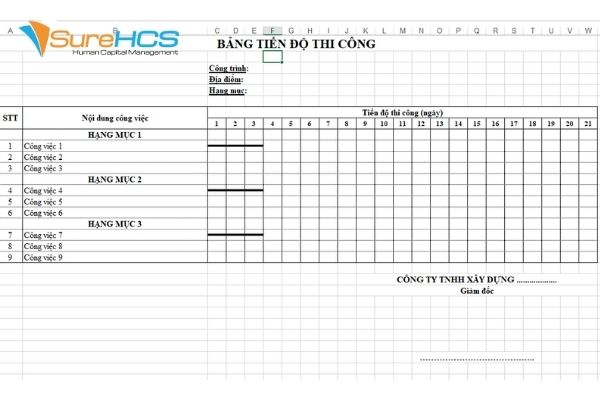
Besides using table construction progress, the enterprise should also be combined using the table track other for like quotation for construction.
4. A number of issues to keep in mind when setting the table construction schedule excel
Make up table construction progress as detailed, it management track progress more easily. So let's set the more details the factors evaluate the track as possible.
Made clear about who is responsible charge of each item related to solved the problem arises accurate and correct object
Need to bring more to the table column reviews.
Thus, the information about file construction schedule in Excel was SureHCS update the details in the article. Hope the content helps the business management, good work performance, accelerate construction.
CONTACT INFORMATION:
- Solutions talent management & Human resources comprehensive LV SureHCS
- Hotline: 0901 555 063 | (+84.28) 3842 3333
- Email: [email protected] – Website: https://www.surehcs.com/
- Headquarters: 23 Nguyen Thi Huynh, P. 8, Q. Phu Nhuan, ho chi minh CITY. Ho Chi Minh






![[Tốt nhất 2026] 10 Phần mềm quản lý nhân sự HRM (hồ sơ, C&B, đánh giá, ...)](https://www.surehcs.com/wp-content/uploads/2025/03/phan-mem-quan-ly-nhan-su-1.jpg)